
Vault QMS
An investigation that teaches.
Platform
Enterprise SaaS
Role
Product Designer
Most Quality Management Systems are built for compliance. They record what happened, satisfy regulators, and close cases — but they don't help organizations learn from past failures.
The central argument of this work: structured knowledge, captured at closure, can transform every investigation into institutional memory. Not just documentation — infrastructure for learning, where each resolved case strengthens the next.
Context
Pharmaceutical QMS is one of the most regulated, role-dense workflows in enterprise software. I built domain fluency before touching a single frame.
Veeva Vault QMS supports the workflows that ensure manufacturing quality, traceability, and regulatory compliance. At the center of this system is CAPA — the structured process used to investigate failures, confirm root causes, and prevent recurrence.
I started by mapping how investigations actually move through the system — not how they're documented to move. That meant understanding the full role topology: who touches a CAPA, at what stage, with what context, and what they hand off when they're done.
The process map surfaced a structural contradiction that shaped everything that followed: every investigation produces valuable knowledge, but each new investigation still starts from zero.
175+
pharma companies running CAPA in Vault QMS today
6
of the top 20 global pharma companies on Vault QMS
7
distinct roles that touch a single CAPA investigation
Roles
Seven roles. One investigation. Almost no feedback loops.
A single CAPA investigation involves seven roles, each responsible for a different part of the process. Work moves from one role to another — across shifts, departments, and sometimes locations.
To understand how investigations actually unfold, I mapped what each role does today, focusing on how work moves in practice rather than how the workflow is documented.
To pressure-test these role definitions, I ran structured walkthroughs with participants taking on each role — validating where handoffs broke down and where knowledge was lost in transit.
Production Operator
Manufacturing · Mobile, on the floor
First to detect the problem on the manufacturing line. Reports the deviation, often using a mobile device while continuing production work. Once the report is filed, their involvement usually ends.
Production Manager
Manufacturing · Desktop or phone
Decides whether production should continue or be paused after a deviation is reported. Communicates decisions to the team and coordinates with quality personnel.
QA Engineer
Quality Assurance · Desktop
Leads the investigation. Reviews the deviation, performs root cause analysis, documents findings, and prepares corrective and preventive actions.
QA Manager
Quality Assurance · Desktop
Reviews incoming investigations, assigns priority and deadlines, approves completed CAPAs, and monitors progress across multiple cases.
Lab Analyst
Quality Control · LIMS + Vault
Performs laboratory testing to confirm suspected root causes when additional evidence is required. Test results are documented and attached to the investigation.
Regulatory Affairs
Regulatory · Desktop
Reviews high-risk CAPAs to ensure regulatory reporting requirements are met. Tracks timelines and ensures required documentation is complete.
Training Coordinator
Quality / HR · Desktop
Updates training records when procedures change as a result of a CAPA. Ensures affected staff are retrained on updated processes.
Problem
QMS tools were built to satisfy regulators. Not to build knowledge.
Current QMS tools are designed to document what happened — capturing records, collecting signatures, and meeting regulatory requirements. But across investigations, knowledge remains difficult to reuse. Similar problems are often solved multiple times, even when prior cases exist.
Each repeated investigation delays production, increases downtime, and creates compliance risk — costs that compound invisibly because no one is tracking what the system failed to retain.
As a result, investigations often begin as isolated efforts — dependent on personal memory rather than shared knowledge — even in systems that store years of historical data.
01
Knowledge buried in unstructured text
Root causes and resolutions are documented as long-form text fields. Similar past investigations exist, but locating them depends on manual search and personal memory rather than structured retrieval.
02
Every investigation starts from zero
Each investigation begins as an independent case. Investigators rely on prior experience or colleague input to recognize patterns from earlier incidents, rather than seeing related cases surfaced automatically.
03
The operator who detected it never learns
Operators who report deviations submit the initial record, but follow-up outcomes are often handled by downstream roles. Visibility into final resolution varies, leaving limited feedback to the original reporter.
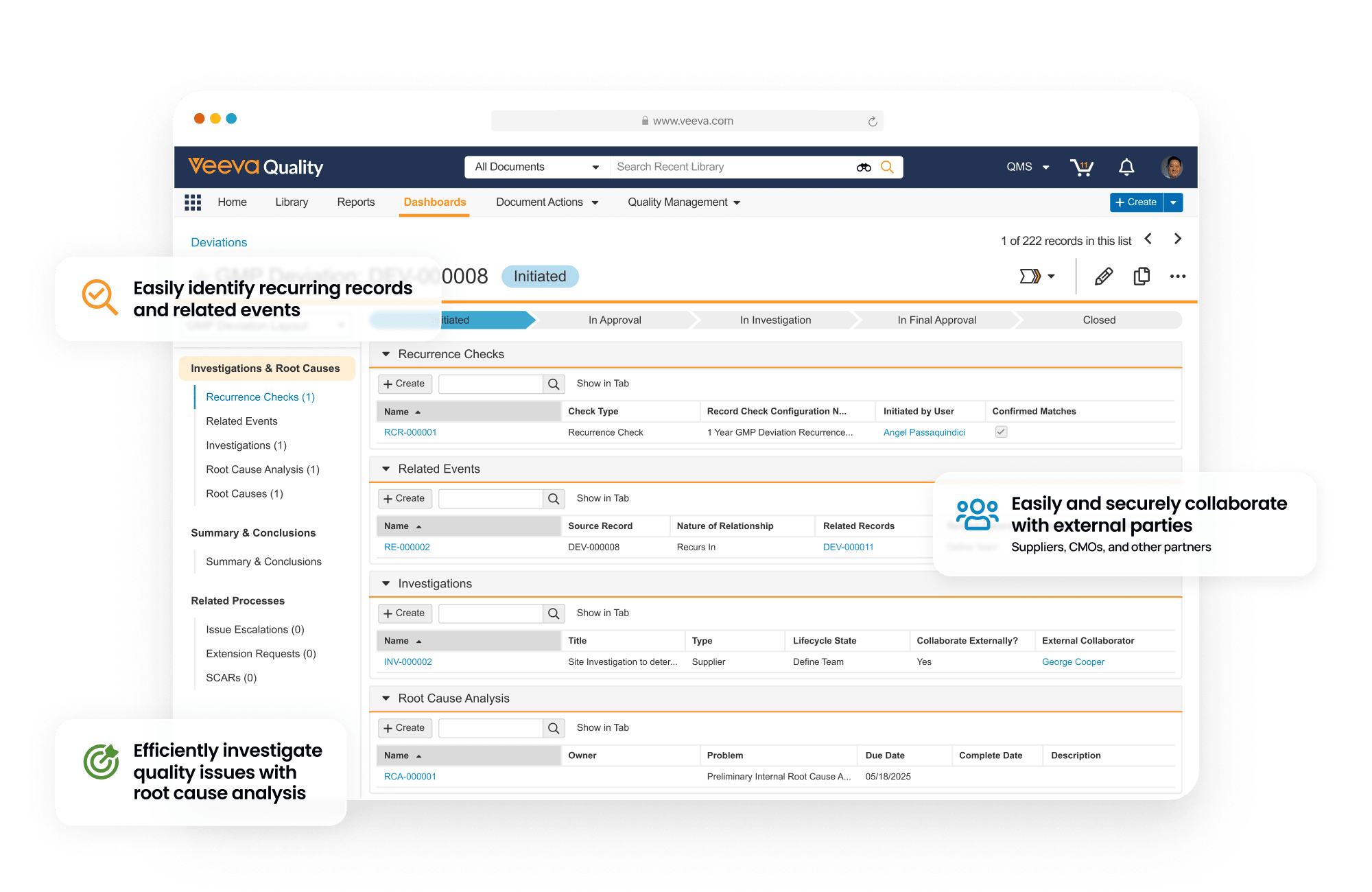
Key Insight
The records exist. The learning does not.
Across investigations, the same types of failures recur — but the way they are documented makes them difficult to compare.
Most CAPA records store conclusions as narrative text, which captures compliance but limits reuse. Without consistent structure, patterns remain hidden across cases, even when similar problems have already been solved.
Operators are not expected to understand the full investigation. Instead, they receive short, plain-language summaries that explain what changed and how it affects their daily work.
Key Insight
If every closed CAPA captured the same core elements, investigations could be compared — not just recorded. Patterns would become visible across cases, instead of remaining buried inside individual reports.
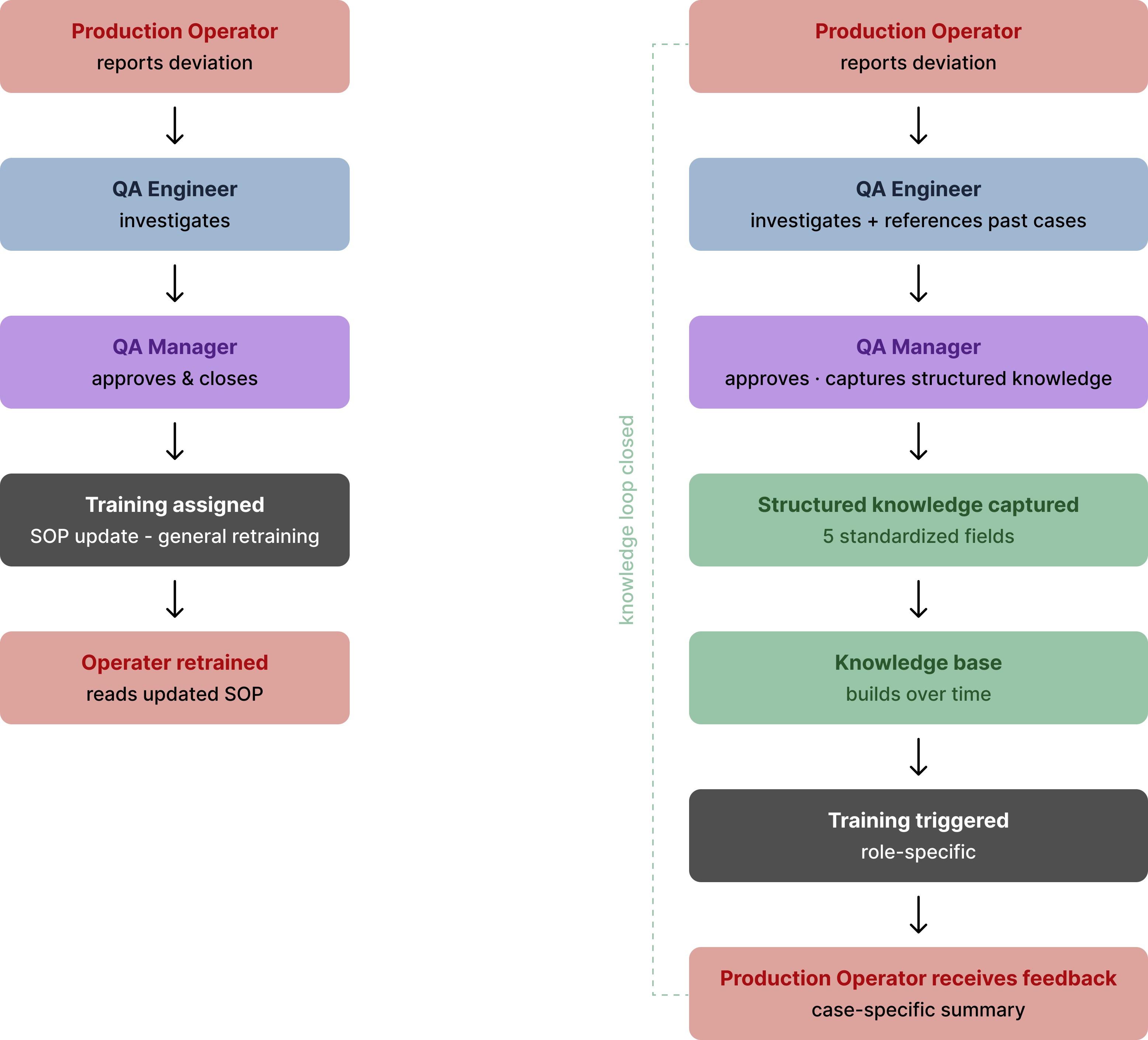
This model does not expand operator responsibilities — it improves clarity. Operators are not involved in root cause analysis, but they do benefit from understanding what changed after a case closes. Instead of generic retraining, they receive short summaries that connect real incidents to updated procedures, reinforcing correct behavior without adding cognitive burden.
Design Decision
Every decision has a reason. Every pixel has a why.
Five decisions shaped by how investigations actually unfold — not by visual preference alone. Each reflects a constraint observed in real CAPA workflows.
01
Organise by quality event, not by object type
Current QMS records are organised by document type — CAPA, Deviation, Lab — each living in separate spaces. But investigations unfold as a sequence of events.
Cases are organised around a single quality event. Deviation, assessment, lab testing, CAPA actions, change control, and training appear in one shared timeline — showing the full journey in context.

02
AI surfaces context before investigation starts — not during
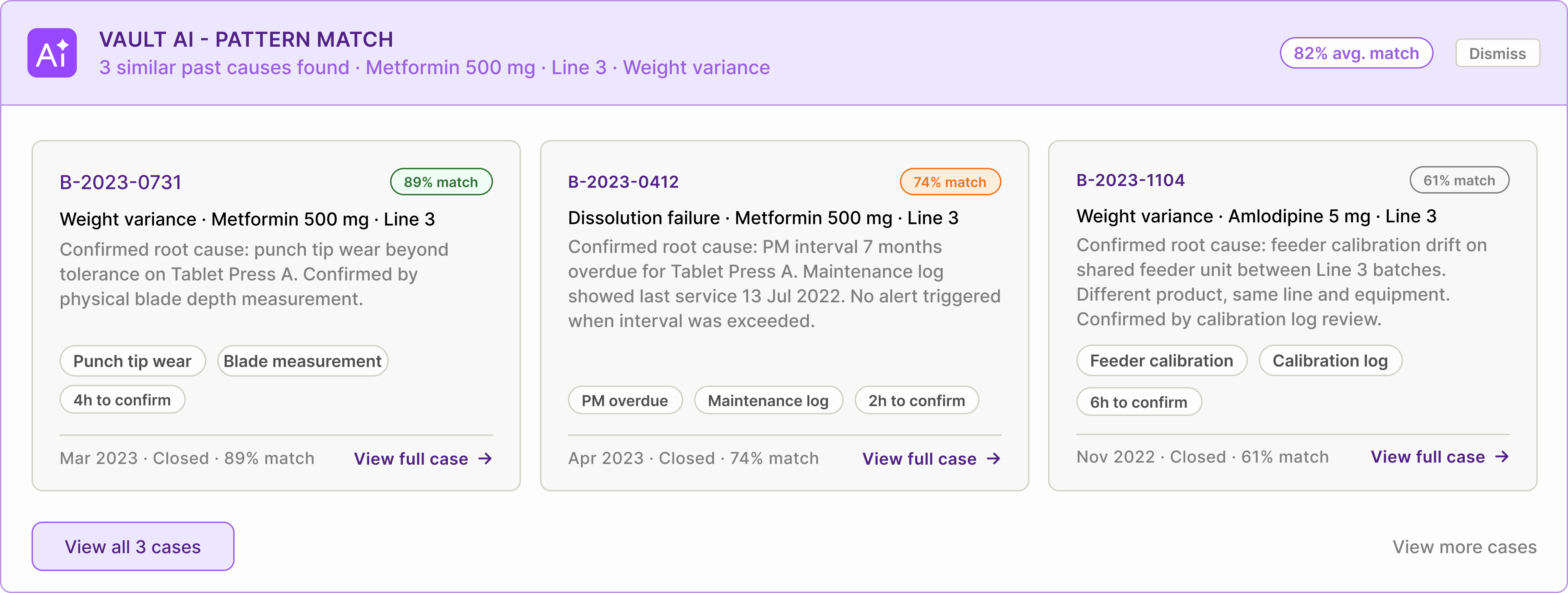
When a deviation is reported, the system searches historical cases using product, line, equipment, and symptom tags. Before the QA Engineer opens the CAPA, relevant past investigations are already visible.
Each suggestion includes confirmed causes, verification methods, and expected investigation paths. Suggestions remain clearly labelled as AI-generated and require human confirmation before entering the audit record.
03
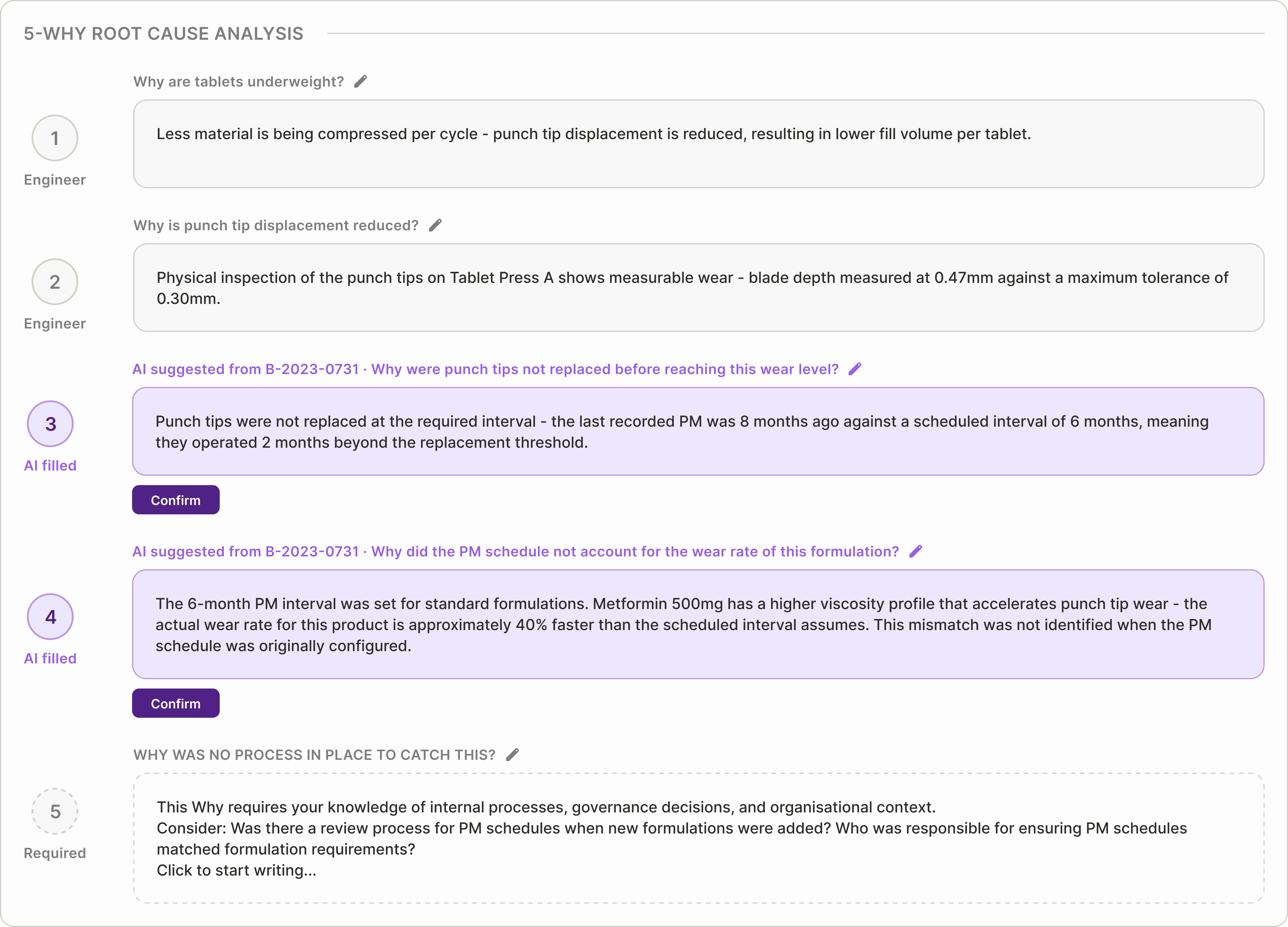
5-Why questions are dynamic, not pre-written
Each Why builds from the previous answer, adapting to the investigation path rather than following a fixed template. Engineers can edit wording at any step.
The fifth Why remains open-ended — organisational causes depend on local process decisions. The system records whether each entry was suggested or manually written, preserving traceability.
04
Root cause is a directly editable textarea — one confirm button
Root cause suggestions appear directly inside an editable field. Engineers review the suggestion, adjust wording if needed, and confirm once.
All edits are automatically recorded in the audit trail, preserving traceability without introducing extra steps.

05
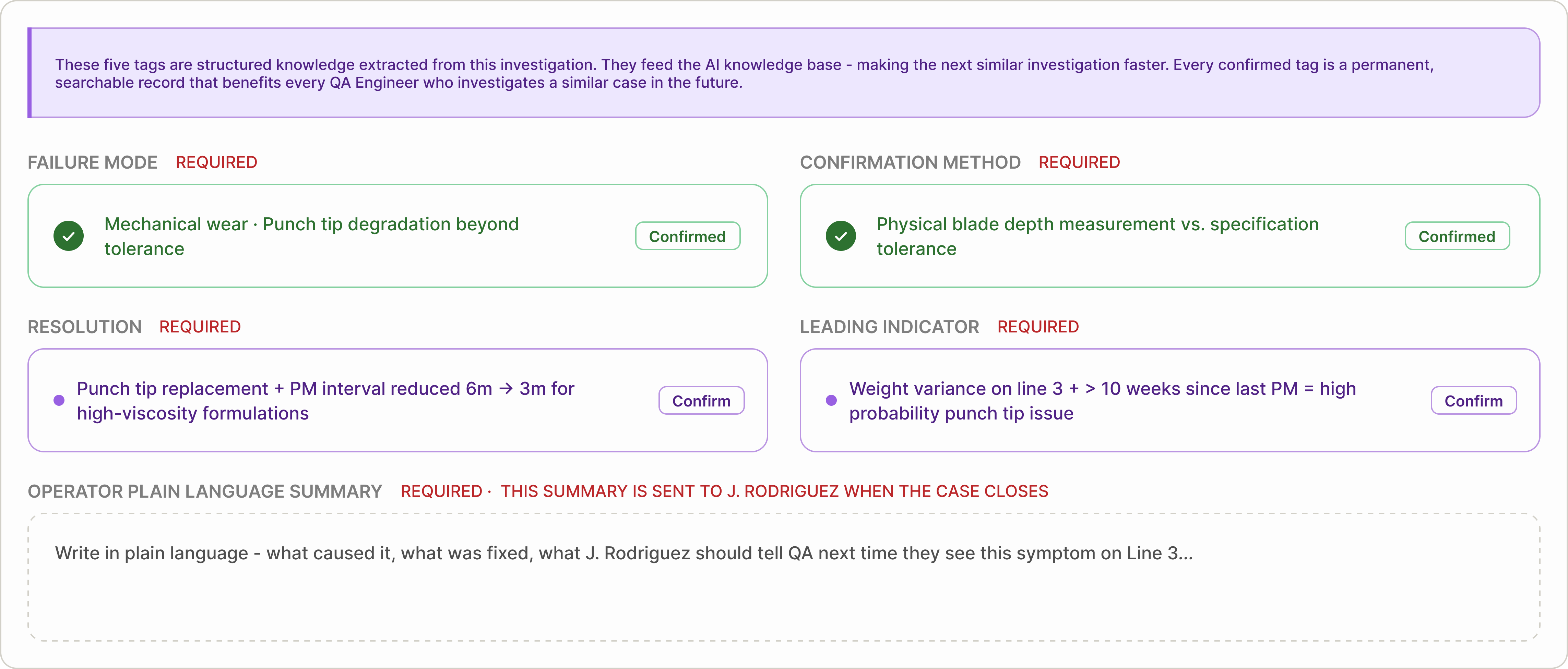
Five structured tags are the gate to closure
Before closure, five structured knowledge fields must be confirmed: Failure Mode, Confirmation Method, Resolution, Leading Indicator, and Operator Summary.
The first four are suggested from investigation data. The final summary is written in plain language for the original reporter. A case cannot close until all five are complete — turning each investigation into reusable knowledge.
Lifecycle
Four stages. One connected story.
To test the design, I followed a single quality event from detection to learning — showing how each role contributes at the moment they naturally interact with the case.
Stage 01
Detection
The operator sees something wrong.
A production operator notices an issue on the line and files a deviation directly from the floor. The form captures structured details — product, batch, line, and observation — so the event can be routed immediately to the right investigator.
Stage 02
Investigation
The engineer doesn't start from zero.
Before opening the CAPA, the system surfaces similar past cases matched by product, line, and issue type. Each shows confirmed causes and verification methods. The QA engineer reviews precedents, runs the 5-Why analysis, and confirms or refines the root cause.
Stage 03
Closure
Five tags. One submission. The investigation becomes knowledge.
Before closing the case, five structured fields must be confirmed: Failure Mode, Confirmation Method, Resolution, Leading Indicator, and Operator Summary. The case cannot close until all five are complete — turning the investigation into reusable knowledge.
Stage 04
Learning
The next investigation starts smarter.
The closed case enters the knowledge base as structured tags. Operators receive a plain-language summary explaining what was found and what changed. Dashboards update with emerging trends. Each resolved case makes the next investigation faster and more informed.
Tagging
Structured information — captured early, confirmed at closure.
Most CAPA systems store investigations as long documents. The details are there, but they are buried inside paragraphs that are difficult to search, compare, or reuse.
In this system, information is structured as tags from the very beginning — not just at closure.
Some tags appear immediately when a case is created — product, batch, line, equipment, and severity. These early tags define where the issue happened.
As the investigation progresses, additional tags are confirmed — what failed, how it was verified, and what actions were taken. These later tags define what was learned.
Together, these tags turn individual investigations into structured data that improves future investigations.
Two types of tags
Not all tags serve the same purpose. This system separates context tags from knowledge tags.
Context tags
Captured at case creation
These tags describe the environment of the issue — product, batch, line, equipment, and severity. They allow the system to immediately group similar cases and surface relevant historical patterns. Without context tags, each investigation starts without direction.

Knowledge tags
Confirmed at closure
These tags capture the results of the investigation — the confirmed failure mode, how the cause was proven, what was fixed, and what signals should be monitored next time. This is the moment when observations become reusable knowledge.
The five knowledge tags
Each closed case produces five structured knowledge tags. Together, they form a reusable reference for future investigations.
01
Failure Mode
What actually failed — not just what was observed. This makes similar failures searchable across products and batches.
02
Confirmation Method
How the root cause was verified. This helps future investigators confirm the same issue with confidence.
03
Resolution
What was changed to fix the issue and prevent recurrence. This becomes the reference action for handling similar cases.
04
Leading Indicator
The early signal that appears before failure occurs. This helps teams detect the issue sooner next time.
05
Operator Summary
A plain-language explanation shared with the operator who reported the issue. This closes the feedback loop and reinforces better reporting.
The system improves with every closed case
A record answers: What happened?
Tagging answers: What should we do next time?
Each confirmed tag turns an investigation into structured knowledge — something future teams can search, recognize, and reuse.
As more cases close with structured tags, the system becomes progressively more useful. Instead of starting from scratch, investigators see relevant historical precedents early, helping them resolve issues with greater speed and confidence.
Over time, recurring patterns become easier to detect. What once depended on individual memory becomes shared knowledge across teams — and eventually across sites.
Knowledge no longer leaves with people. It stays in the system and improves with every case.
Before vs. After
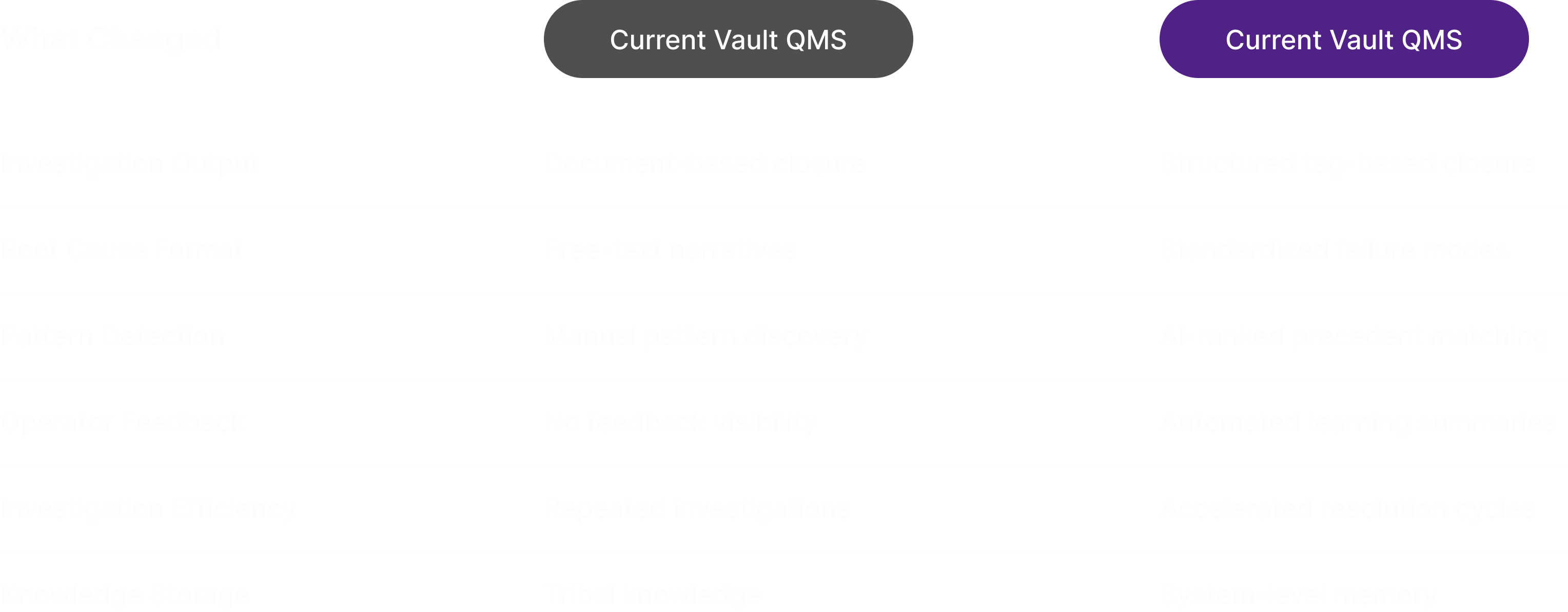
Before structured tagging, investigations closed as documents — complete, compliant, but difficult to reuse. Similar issues often required teams to start from scratch, relying on memory and manual search to locate relevant past cases.
After structured tagging, each closed investigation produces reusable knowledge. Root causes become searchable, patterns become visible across cases, and future investigations begin with context instead of uncertainty — reducing repeated work and improving resolution speed.
Tradeoffs
Every constraint required a decision.
Designing for a regulated environment means compliance and usability often pull in opposite directions. These are the three tradeoffs I made deliberately.
Each tradeoff favors long-term reliability over short-term convenience.
01
Mandatory tags vs. engineer autonomy
Five tags are required before a case can close — no workaround. This introduces friction for engineers who want to submit quickly. But structured closure only works when every case contributes usable knowledge. One untagged investigation creates a gap. Making tags optional would gradually weaken the system — until it stops being reliable.
02
AI suggests vs. AI decides
The AI could automatically confirm root causes and pre-fill tags — saving time. But in a regulated environment, every documented conclusion must be owned by a named person. AI suggestions remain visually distinct, require explicit confirmation, and record who approved them. Speed was intentionally traded for traceability.
03
Event-based navigation vs. familiar object-type navigation
Organizing cases by investigation flow is more intuitive for new users. But QA engineers trained on existing systems expect to find cases in flat lists. Changing that mental model introduces adoption risk. The new structure must feel immediately clearer during the first session — or users will revert to old habits.
Full Lifecycle
Three stages that complete the lifecycle.
This case study focused on the investigation stage in depth. These remaining stages complete the lifecycle — from initial report to final feedback. And each stage plays a role in turning a single report into reusable knowledge.
Stage 1
Mobile floor report
The lifecycle begins on the production floor. Operators scan a batch barcode, photograph the defect, and select the issue type — submitting a report in under 60 seconds without leaving the line. This is where the first structured tags enter the system.
Stage 3
QA Manager approval view
Before closure, QA Managers review each investigation in a risk-stratified queue. AI highlights confidence levels and supporting evidence, enabling fast approval of strong cases and targeted feedback on weak ones. This is where accountability is formally recorded.
Stage 4
Operator feedback card
When the case closes, the operator receives a plain-language summary of what happened — what caused the issue, what was fixed, and what to report next time. This closes the loop between reporting and learning.
Reflection
What changed how I think.
This project revealed gaps that shaped how I now approach enterprise design.
01
Five is a hypothesis, not a conclusion
Five tags felt like the minimum that would make pattern matching useful without slowing engineers down. Fewer created unreliable signals. More added friction. But the right number shouldn't be assumed — it should be tested with real engineers. The final answer may be four, or it may be six.
02
The real problem wasn't UI — it was workflow.
Early on, I focused on improving the investigation screen. Mapping all seven roles showed that the real problem wasn't a single interface — it was how work moved across people. The investigation screen only works because operators, labs, managers, and trainers are connected to it. Designing the system mattered more than refining individual screens.